 Script task
Executes a script to directly access Java beans in the configuration as well as task and execution beans. Script tasks achieve most of the same functions of a Java class.
Examples
- Initialize variables at the start of a process.
Tip: Use a script task immediately after the start event to initialize variable values or retrieve data from a web service.
- Parse form fields.
- Access exposed spring bean properties.
- Make decisions based on simple logic.
- Transform data.
Languages for script tasks
Przestroga :Scripts are a powerful way to accomplish tasks or they can do a lot of damage. You must be qualified in the script language before you use a script task.
-
Groovy is strongly recommended because of fast performance, and it includes JsonSlurper to parse JSON responses from APIs.
-
JavaScript is supported but it suffers from slow performance, is less flexible, and makes it hard to access Java functions.
- Any JSR-223 compatible language can be used. Java Specification Requests (JSR-223) defines a framework for embedding scripts into Java source code.
A script task can declare process variables: execution.setVariable("varDays",noOfDays+1);
To refer to a process variable or other expression from a text field, use the following notation: ${varName}
Uwaga: If the script generates a runtime exception, an error message is displayed. (R6?)
Error handling in script tasks
To minimize the chance of breaking a process due to an error, you can use a boundary event to move the flow to another route.
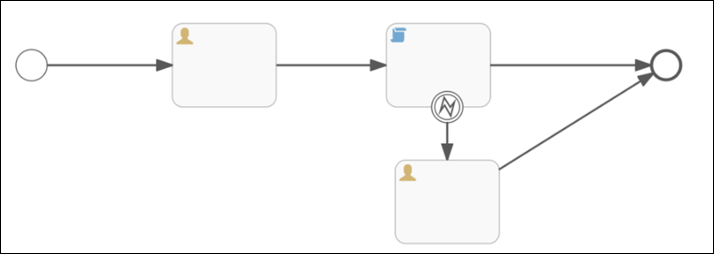
For example,
- try{
- undefin();
- }catch(error){
- execution.setVariable("error_message", err.message);
- throw new org.activiti.engine.delegate.BpmnError ("error_message",erromessage)'
- }
Example script tasks
 Start a process from a timer
To start a Business Process by a timer, you can use a script task with the following properties:
-
execution.setVariable("ext_tenantId", "manufacturing");
-
execution.setVariable("initiator","10015");
Uwaga: The wfc_url parameter is optional and not needed to initialize the script task.
Create an initialization script
You can start a Business Process with an initialization script task that automatically imports data — such as person or group information — for use throughout the process. This can improve performance by reducing the number of times to import data. You can add a timer start event just before the script task to start the process at a specific time. Or an initial user task could require a person to enter information in a form from the Control Center to start the process.
-
Insert a Script Task immediately after the start event.
Script taskExecutes a script to directly access Java beans in the configuration as well as task and execution beans. Script tasks achieve most of the same functions of a Java class.
- Select the script task. In properties:
- Enter a Name. Example: Init or Initialize
- In Script Format, enter groovy.
- Select Script.
Enter an array of user or group IDs.
Example initialization of an assigneeList process variable
import com.activiti.domain.idm.User;
import com.activiti.security.SecurityUtils;
out.println('Start - Initialize moving estimate');
User currentUser = SecurityUtils.getCurrentUserObject();
ArrayList idList = new ArrayList();
Long tenantId = currentUser.getTenantId();
List<User> users = userService.getAllUsers(0,999,tenantId);
for (User u : users) {
idList.add(u.getId());
}
execution.setVariable('assigneeList', idList);
out.println('End - Initialize moving estimate');
- Kliknij Dotknij Save.
Get values from form fields
You can access form field values by way of a script task with the following properties:
-
var varName = execution.getVariable("FormFieldID");
- FormFieldID is the ID associated with that form field.
- The value of this field is the value of the form field.
- In the case of radio buttons and drop-down selection lists, the value is the ID of the selected button or value. Example: You can get the selected value of a radio button.
To get access to a variable that is created in a script outside the script task, you must set it as an execution variable in the script as follows:
-
execution.setVariable("varName", “varValue”);
Execution variables are accessible outside of scripts, for example in service task properties and forms, as follows:
-
${executionVariableName}
Reminder Process Model
This pre-configured Business Process Model sends reminder notifications.
- Validate Employee ID: Verify that the employee identification number is specified; if not, send an error message.
var EmployeeID = execution.getVariable("EmployeeID");
if(EmployeeID == null || EmployeeID.isEmpty() ){
execution.setVariable("ErrorString","Missing EmployeeID");
}
- Validate Generic Notification Name:
- Verify that the notification is specified; if not, send an error message.
- Similar script to Validate Employee ID
- Exclusive Gateway:
- If the notification timer ${GenNotificationTimerDuration == "} is specified, calculate the delay.
- If not, use the default date based on GenNotificationDate.
- TimerCatchEvent: Set the delay (Calculate Delay or Set Default Delay) before continuing the process.
-
Send Generic Notification: Send the notification. The execution variables are defined in the Generic Notification API Service Task and provide the input parameters for the notification.
Validation script
requestItemsList = execution.getVariable("RequestedItems");
execution.setVariable("CUSTOM_VALIDATE_RESULT", "1");
var hasReqOn = execution.getVariable("hasRequestOn");
var canSubmitRequest = execution.getVariable("CanSubmitRequestForApproved");
if(canSubmitRequest == "false"){
execution.setVariable("showErrorMsg", "true");
}
var showErrorMsg = execution.getVariable("showErrorMsg");
if(hasReqOn == "true" || showErrorMsg == "true"){
execution.setVariable("CUSTOM_VALIDATE_RESULT", "0");
execution.setVariable("CUSTOM_VALIDATE_ERROR_MESSAGE", "The request conflicts with a previously approved request. Verify the information in the request and submit again.");
}